01. Overview
Small and medium enterprises are increasingly targeted by cyberattacks that exploit excessive user and administrative privileges. While Zero Trust Architecture (ZTA) has emerged as an effective security model to address these risks, its full implementation often requires resources, expertise, and organisational maturity that exceed the capabilities of many small organisations.
Least Privilege Access is widely recognised as a foundational element of Zero Trust — ensuring that users, devices, and services are granted only the minimum access necessary to perform their functions. Poor privilege management, including standing administrative access and privilege creep, significantly increases an organisation's attack surface.
To design, implement, and evaluate a risk-based Least Privilege Access model as a foundational control within the context of Zero Trust Architecture for a small enterprise environment — demonstrating that meaningful security improvements are achievable without full architectural transformation.
Project Objectives
- Examine Least Privilege Access as a foundational Zero Trust control
- Identify risks arising from excessive privileges in SME environments
- Design and implement a risk-based Least Privilege model in a simulated environment
- Evaluate its effectiveness in reducing cybersecurity risk
- Critically reflect on feasibility and limitations for small enterprises
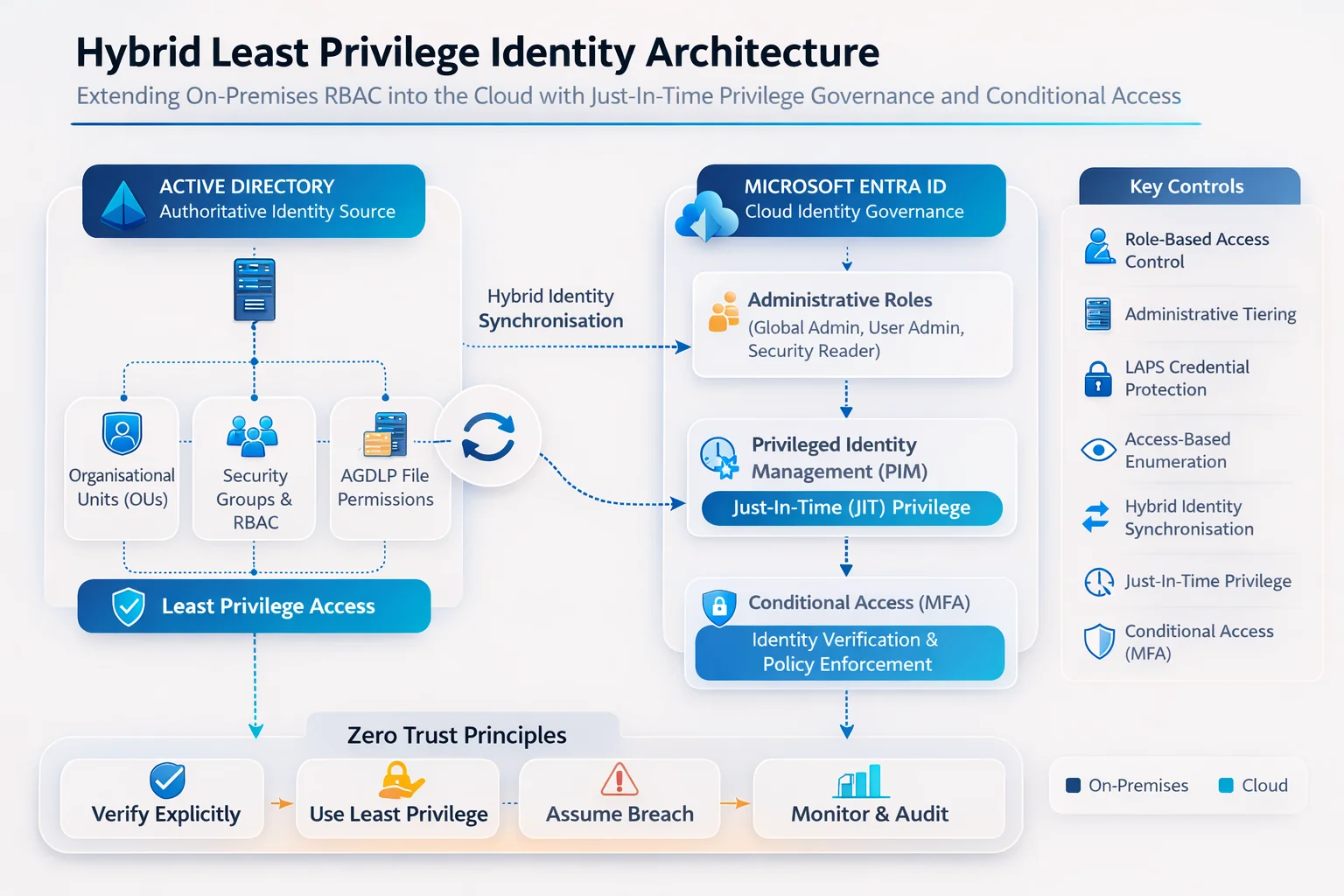
Architecture Overview
02. Literature Review
This review examines two key sources: Syed (2025) Zero Trust Principles and the Evolution of Privilege Access Management Architectures, and Lund et al. (2024) Zero Trust Cybersecurity: Procedures and Considerations in Context.
Key Findings from the Literature
Syed (2025) explores how Zero Trust principles have transformed Privileged Access Management from static, perimeter-dependent controls to adaptive, identity-centric architectures. Traditional security models inadequately address contemporary threats — including credential compromise, cloud-based attacks, and insider misuse — due to implicit trust in authenticated internal users. The paper highlights innovations such as passwordless authentication, just-in-time (JIT) privilege provisioning, and session-based access control as strategies to reduce standing privileged access and limit lateral movement.
Lund et al. (2024) conceptualise Zero Trust primarily as a set of procedural and governance principles rather than a purely technical architecture. Anchored in "never trust, always verify," the paper discusses MFA, dynamic authorisation, network segmentation, and the adoption of an "assume breach" mindset. The principle of least privilege is emphasised through RBAC, contextual access decisions, and segmentation strategies.
Both sources confirm that identity is the new security perimeter and least privilege is the highest-impact entry point for Zero Trust adoption — deployable in resource-constrained environments using existing cloud-native platforms without significant infrastructure cost.
Critical Gaps Identified
A significant gap in both sources is the lack of explicit guidance for phased implementation and evaluation of least-privilege controls in simulated small-enterprise environments. Neither work directly addresses the incremental deployment of identity-centric controls using cloud-native identity platforms — which is precisely what this project addresses.
03. Lab Environment Design
The implementation deployed a hybrid identity environment within a controlled home laboratory using Microsoft Windows Server and Microsoft Entra ID, reflecting the architecture adopted by organisations that combine on-premises infrastructure with cloud services.
Infrastructure Components
| System | Role |
|---|---|
| Server 2025 LAB / DC01 | Domain Controller — Active Directory Domain Services |
| FS01 | File Server — departmental share hosting |
| AADSYNC01 | Identity Synchronisation Server (Entra Provisioning Agent) |
| CLIENT01 | Domain Workstation — access validation testing |
| Microsoft Entra ID / M365 Tenant | Cloud identity platform — RBAC, Conditional Access, PIM |
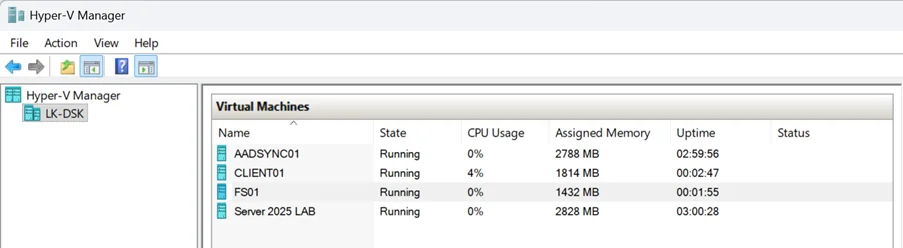
The hybrid design was deliberately chosen to reflect the reality faced by many SMEs: organisations that cannot migrate fully to the cloud but are increasingly consuming cloud services such as Microsoft 365 alongside traditional on-premises infrastructure. This mixed model introduces identity management complexity that, if unaddressed, creates privilege gaps at the boundary between environments.
Active Directory OU Structure
| Organisational Unit | Purpose |
|---|---|
| LAB-Users | Standard user accounts |
| LAB-Groups | Security groups used for RBAC |
| LAB-Servers | Infrastructure servers |
| LAB-Workstations | Client computers |
| LAB-ServiceAccounts | Managed service accounts |
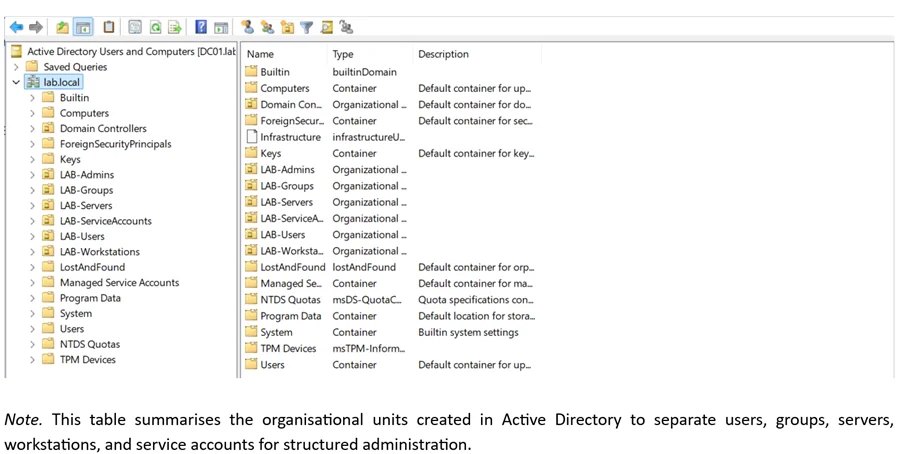
04. RBAC & Admin Tiering
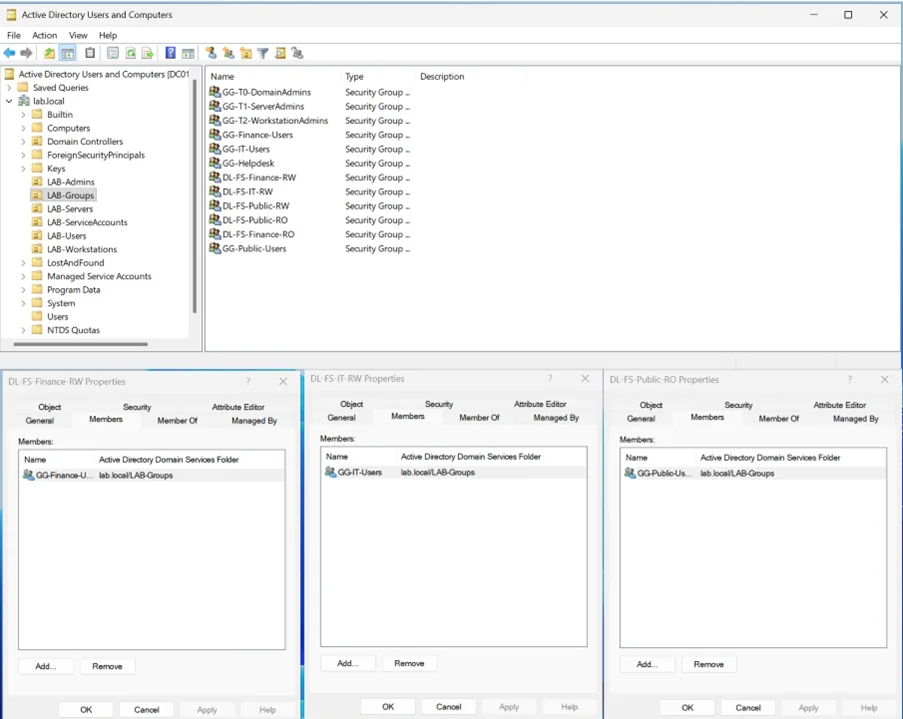
RBAC was implemented to enforce least privilege by assigning permissions to roles rather than individual users, reducing administrative complexity and the risk of excessive privilege assignment.
Three-Tier Administrative Model
| Tier | Scope | Security Group |
|---|---|---|
| Tier 0 | Domain Controllers & Identity Infrastructure | GG-T0-DomainAdmins |
| Tier 1 | Servers & Infrastructure Services | GG-T1-ServerAdmins |
| Tier 2 | Workstations & User Endpoints | GG-T2-WorkstationAdmins |
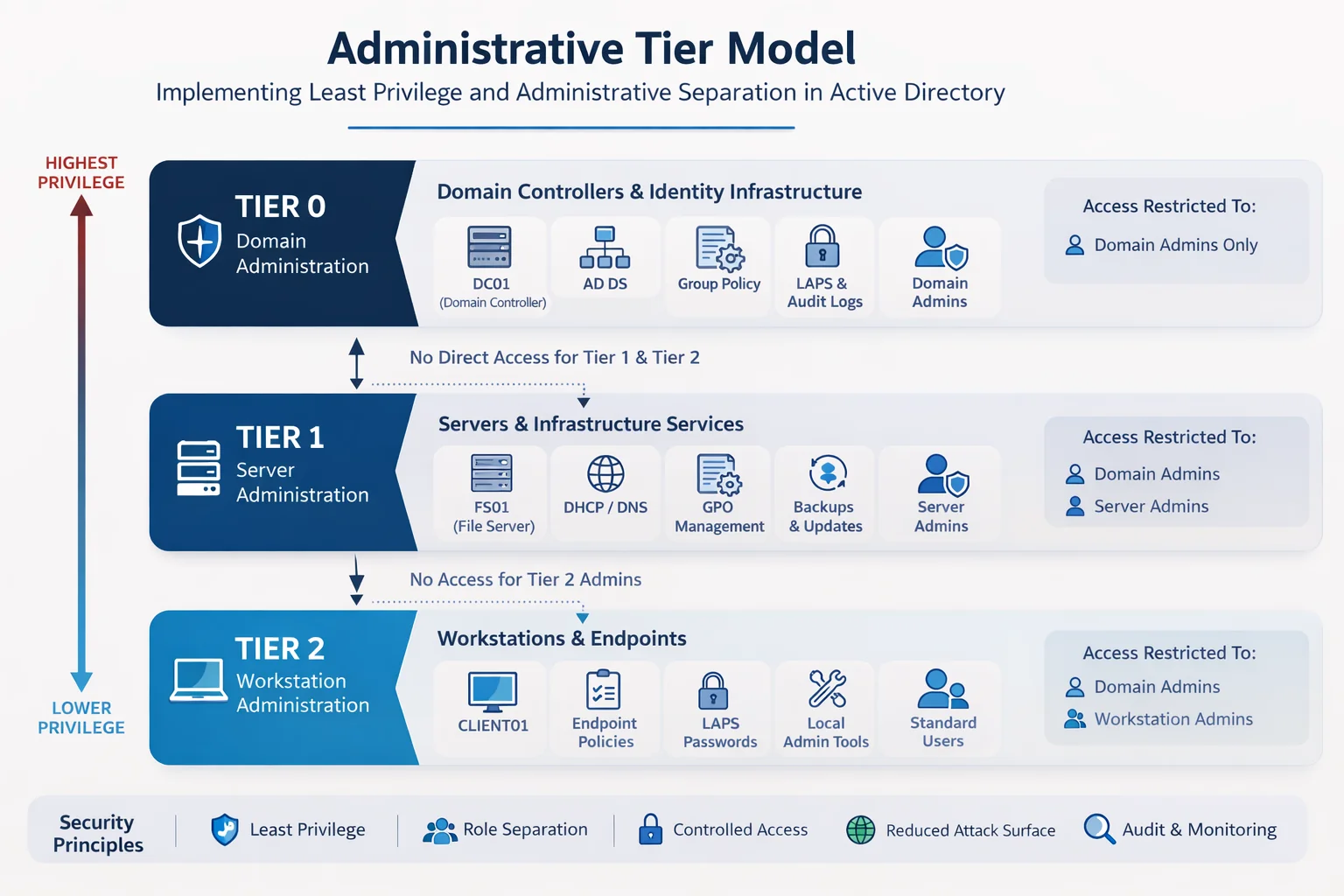
This tier separation ensures that a compromised workstation administrator account cannot be used to access servers or domain controllers — containing the blast radius of credential theft. A GPO named Tier2-Deny-Server-Logon enforces this boundary via deny logon user rights assignments.
05. Security Hardening
Workstation Security Baseline
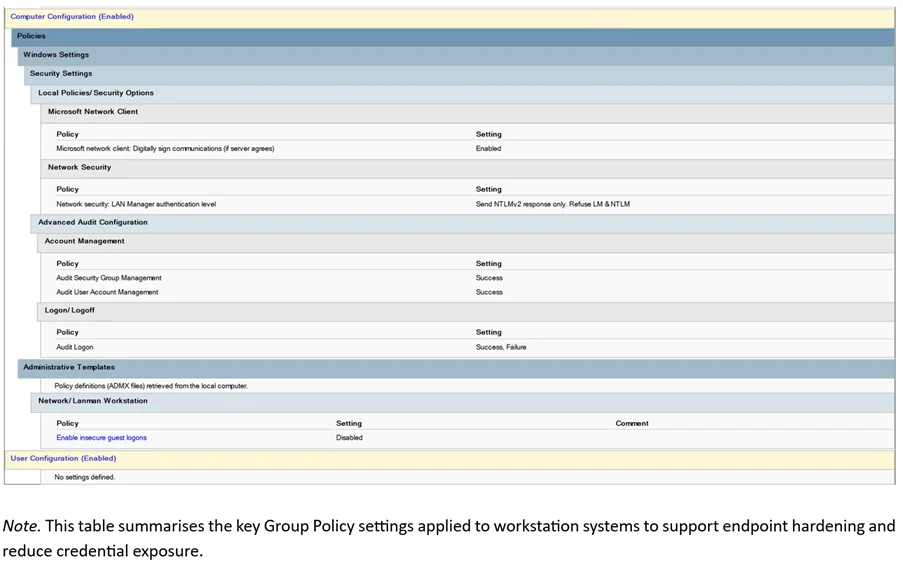
A Group Policy Object named Workstation-Security-Baseline was linked to the LAB-Workstations OU, applying baseline security configurations to protect endpoints against credential exposure risks.
| Policy | Configuration | Rationale |
|---|---|---|
| Enable insecure guest logons | Disabled | Prevents unauthenticated SMB access |
| LAN Manager authentication level | NTLMv2 only | Eliminates weaker legacy auth protocols |
| Audit logon events | Success and Failure | Visibility for incident detection |
Server Security Baseline
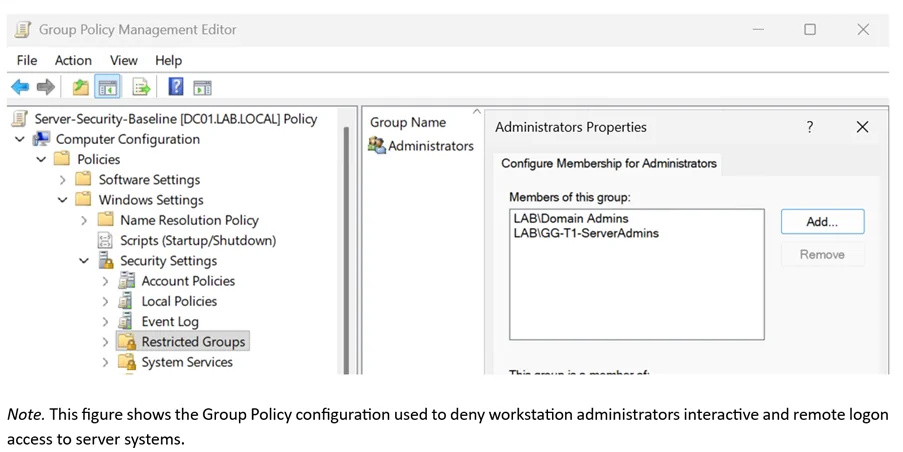
A Server-Security-Baseline GPO was linked to the LAB-Servers OU. Using Restricted Groups policy, local Administrators group membership on all servers was centrally locked to only LAB\Domain Admins and LAB\GG-T1-ServerAdmins.
Microsoft LAPS
Microsoft LAPS was deployed to eliminate shared local administrator passwords across workstations. LAPS automatically generates unique, periodically rotated passwords per workstation and stores them securely in Active Directory, retrievable only by authorised administrators.
| Setting | Value |
|---|---|
| Password Length | 14 characters |
| Password Complexity | Letters, numbers, special characters |
| Password Rotation | Every 7 days |
| Backup Location | Active Directory |
Get-LapsADPassword CLIENT0106. File Server Access Control
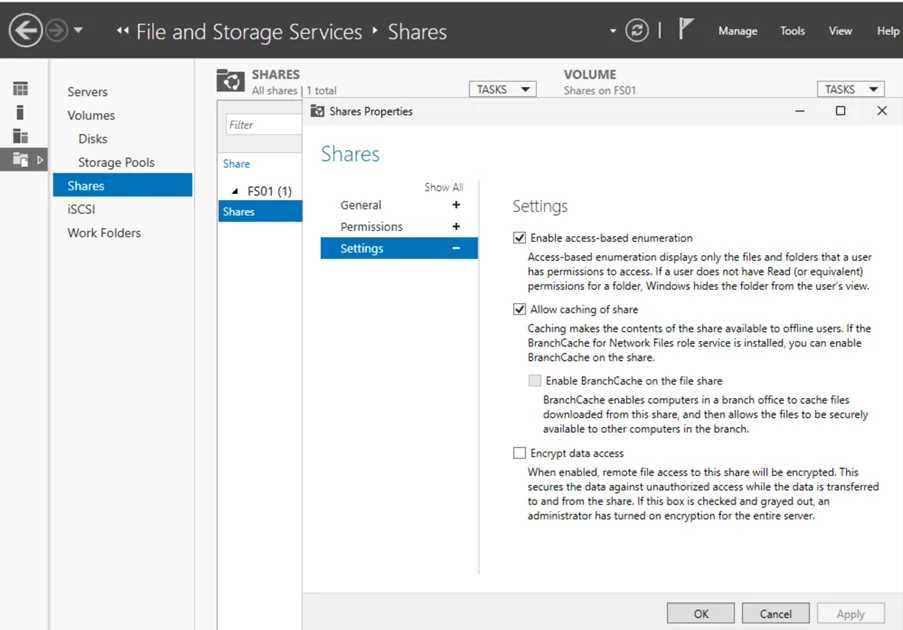
Least privilege was demonstrated through controlled access to three departmental file shares hosted on FS01 (Finance, IT, and Public), ensuring users could only access data required for their role.
AGDLP Permission Model
User Account → Global Group → Domain Local Group → NTFS Permissions

Example:
finance.user → GG-Finance-Users → DL-FS-Finance-RW → Modify (NTFS)
NTFS Permission Assignments
| Share | Group | Access Level |
|---|---|---|
| Finance | DL-FS-Finance-RW | Modify |
| Finance | DL-FS-Finance-RO | Read and Execute |
| IT | DL-FS-IT-RW | Modify |
| Public | DL-FS-Public-RO | Read and Execute |
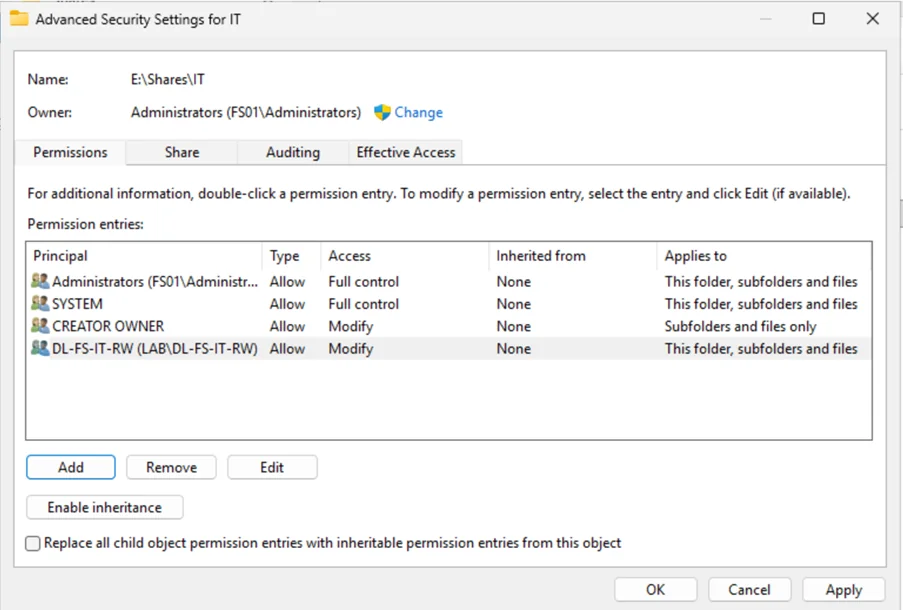
A finance user who cannot enumerate the IT share cannot identify targets for lateral movement or data exfiltration. Least privilege combined with Access-Based Enumeration functions as both an access control and a reconnaissance countermeasure.
Validation Results
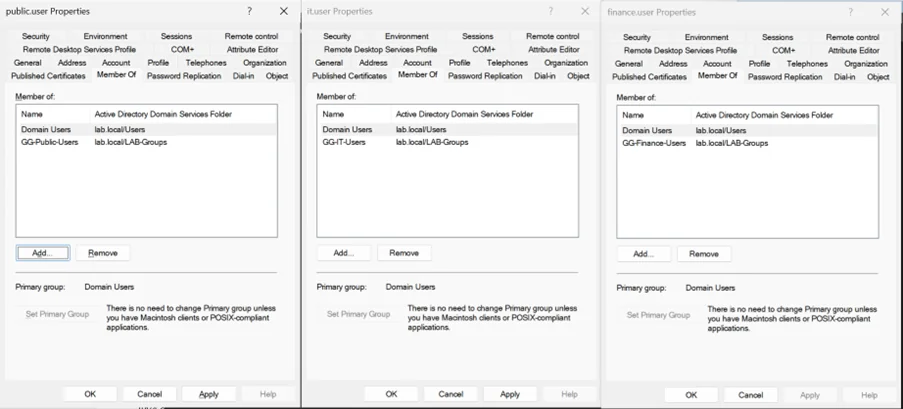
- finance.user — accessed Finance share only; IT and Public folders not visible
- it.user — accessed IT share only; Finance folder not visible
- public.user — restricted to Public share only
07. Hybrid Identity Integration
To extend identity management capabilities to the cloud, the on-premises Active Directory environment was integrated with Microsoft Entra ID using Microsoft Entra provisioning agents installed on AADSYNC01.
Without hybrid identity, organisations managing both environments risk operating two disconnected identity planes — one governed by Active Directory policies, and one ungoverned in the cloud. This fragmentation creates conditions where least privilege applied on-premises is not carried through to cloud resource access, undermining the model at the boundary.
By synchronising identities through Entra provisioning agents, the project established a single authoritative identity source spanning both environments — ensuring role-based controls defined in Active Directory are consistently reflected in cloud identity governance.
08. Microsoft Entra Security Controls
Following hybrid synchronisation, Microsoft Entra ID extended the on-premises governance model into the cloud via RBAC, Privileged Identity Management, and Conditional Access.
Entra RBAC Role Assignments
| Role | Purpose | Assignment Type |
|---|---|---|
| Global Administrator | Tenant configuration & identity management | Eligible (JIT) |
| User Administrator | User lifecycle & group management | Eligible (JIT) |
| Security Reader | Security monitoring & log review | Active (permanent) |
Just-In-Time Privilege Elevation (PIM)
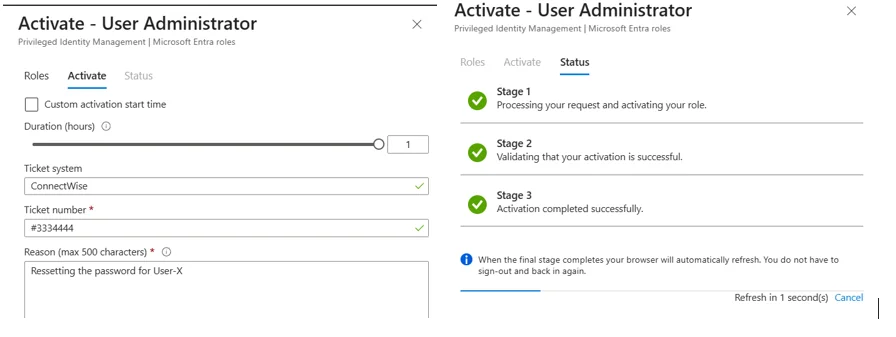
Privileged roles are assigned as eligible rather than permanently active, requiring administrators to activate them through the PIM interface with operational justification and a service desk ticket reference. Activated roles expire after one hour with a full audit record generated per activation.
| Role | User Administrator |
| Resource | SME-ZeroTrust-Lab |
| Start | March 15, 2026 11:59 UTC |
| End | March 15, 2026 12:59 UTC |
| Justification | Resetting the password for User-X |
| Ticket system | ConnectWise |
| Ticket number | #3334444 |
Conditional Access — MFA for Privileged Roles
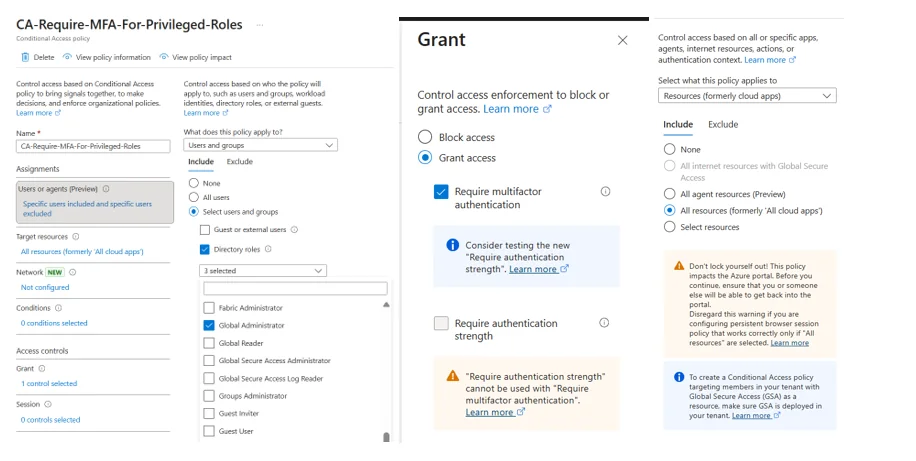
Conditional Access was configured to require MFA for all privileged administrative accounts, ensuring elevated roles are protected by explicit identity verification beyond passwords alone.
09. Findings & Conclusion
This project successfully designed, implemented, and evaluated a hybrid least privilege architecture within a simulated SME environment, demonstrating that least privilege functions as a practical and high-impact Zero Trust control even under resource constraints.
Key Outcomes
- Persistent admin privileges eliminated — replaced with role-based assignments and JIT elevation via PIM
- Shared local admin passwords replaced — unique, rotating credentials per workstation via LAPS
- Unrestricted file share visibility eliminated — strictly scoped NTFS access with ABE removing reconnaissance paths
- Tier isolation enforced — GPO boundaries prevent lower-tier credentials from accessing higher-value systems
- Unified identity plane — hybrid Entra ID sync eliminates the privilege gap at the environment boundary
Limitations
The implementation assumes consistent identity governance and disciplined role management. Operational pressures may lead to privilege creep over time. The project is a controlled simulation and does not incorporate endpoint detection, device compliance policies, or network-level segmentation.
Meaningful Zero Trust-aligned security improvements are achievable without full architectural transformation. By combining RBAC, administrative tiering, LAPS, hybrid identity synchronisation, cloud role governance, and JIT privilege elevation, the implementation significantly reduced unnecessary access rights. Least privilege is a realistic and measurable first step for small enterprises strengthening their cybersecurity posture.
References
- Center for Internet Security. (2023). CIS Microsoft Windows Server 2022 benchmark.
- Joint Task Force. (2020). Security and privacy controls for information systems and organizations. NIST SP 800-53r5.
- Lund, B. D., et al. (2024). Zero trust cybersecurity: Procedures and considerations in context. Encyclopedia, 4(4), 99.
- Microsoft. (2022). Enterprise access model. Microsoft Learn.
- Microsoft. (2023). Windows LAPS overview. Microsoft Learn.
- Microsoft. (2024). What is Microsoft Entra Privileged Identity Management? Microsoft Learn.
- National Cyber Security Centre. (2022). Introduction to identity and access management. NCSC.
- Rose, S., et al. (2020). Zero trust architecture. NIST SP 800-207.
- Syed, S. (2025). Zero trust principles and the evolution of privilege access management architectures. Journal of Computer Science and Technology Studies, 7(7), 866–873.